Overview
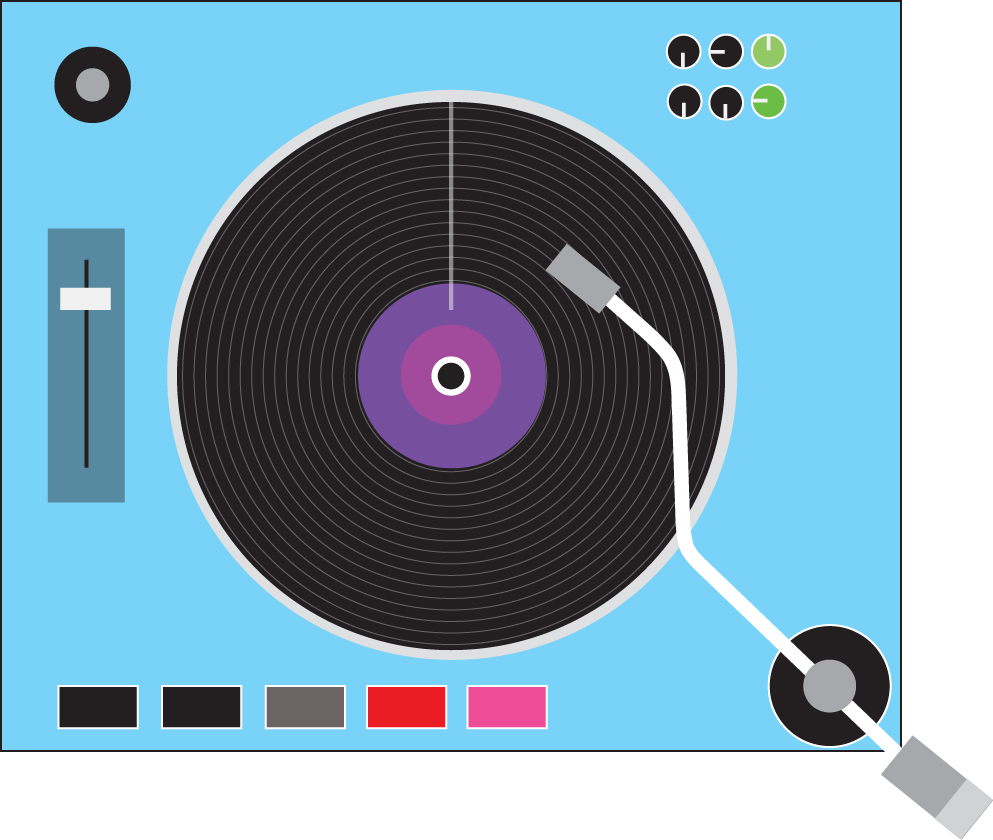
A collaborative project with my classmate and friend Liam, the Music Mixer App is an advanced interactive web application that provides a music production environment. While Liam handled the web development and technical architecture, I owned the entire design and audio experience: creating all visual assets in Photoshop and Illustrator, designing the record player UI elements, and producing original beat compositions in FL Studio. This project demonstrates how cross-disciplinary collaboration creates powerful digital experiences.
My Role & Creative Process
As the design and audio specialist, I owned the complete creative vision. I used Photoshop to craft pixel-perfect UI designs and visual mockups that guide users through the mixing experience. I created the record player interface and control elements in Illustrator, ensuring a cohesive, professional look. Most importantly, I composed original beats and tracks in FL Studio, giving the app authentic, creative audio content that users mix and manipulate. Meanwhile, Liam implemented the web application logic using JavaScript and the Web Audio API — handling array-driven beat assignment (pulling beats into their respective channels/labels), sound playback, event handling, and the hamburger menu functionality.
Design & Architecture
Frontend: HTML5, CSS3 and JavaScript for UI, interaction, and application logic
Audio Engine: Web Audio API for real-time audio processing and routing
UI Framework: Custom HTML/CSS with Canvas used for visualizations and interactive controls
Data Structure: Object- and array-driven design to manage mixer channels, beats, presets, and parameters
Solution Implemented
- Interactive Mixer UI - Built a responsive, record-player inspired mixer interface using semantic HTML and CSS, with Canvas for realtime visual feedback
- JavaScript Implementation - Modular ES6 code for UI interactions, audio control, and state management; Liam handled array-driven beat mapping, sound loading/playback, and navigation controls
- Web Audio API Integration - Real-time audio graph with audio nodes for mixing, gain control, EQ filters, and effects processing
- Audio Data Management - Arrays and objects map beats to channels/labels, manage presets, and enable save/recall operations
- Interactive Controls - DOM and touch events power faders, knobs, and buttons with immediate audio feedback and mobile-friendly touch support
- Visualization - Real-time waveforms and frequency spectrum via Web Audio Analyser and Canvas API, synchronized with audio playback
Technologies & Tools - My Contributions
- UI/UX Design: Photoshop - Created detailed mockups, visual designs, and interface elements for intuitive user interaction
- Logo & Iconography: Illustrator - Designed the record player interface, control elements, and brand-consistent visuals
- Audio Production: FL Studio - Composed original beats and musical tracks that users mix and manipulate in real-time
Technologies - Liam's Web Contributions
- HTML5 (semantic structure, audio elements)
- CSS3 (UI styling, responsive layout)
- JavaScript (ES6+, modular code for audio and UI)
- Web Audio API (real-time audio processing)
- Canvas API (2D visualizations and UI feedback)
- DOM Event Handling (interaction, touch support, hamburger menu)
Key Features
- Multi-Channel Mixer: Control multiple audio sources independently
- Interactive Visualization: Immersive, real-time visual feedback of audio levels and spectrum
- Real-Time Processing: Instant audio feedback as controls are adjusted
- Effects Suite: Professional audio effects (EQ, reverb, compression, etc.)
- Visual Feedback: Real-time spectrum analysis and level metering
- Responsive Design: Works on desktop (optimal) and tablet devices
- Preset System: Save and recall mixer configurations
- Interactive Learning: Intuitive controls teach audio mixing concepts
Advanced Technical Features
- Canvas Visualizations: Custom waveform and spectrum rendering with Canvas and the AnalyserNode
- Object-Oriented Architecture: Modular mixer component system
- Event-Driven UI: Efficient DOM updates based on user interactions
- Audio Graph: Complex routing of audio signals between nodes
- Performance Optimization: requestAnimationFrame for smooth rendering and efficient audio updates
- Touch Support: Mobile-friendly touch controls for interactions
- Audio Analysis: Real-time frequency analysis for visualization
Results & Impact
- Successfully demonstrated collaborative web development between design and engineering
- Created fully functional interactive music production environment
- Smooth 60fps performance on modern hardware
- Intuitive interactions with professional UI/UX
- Professional-grade audio mixing with original musical content
- Educational value for learning audio production concepts
- Engaging user experience combining aesthetics, audio, and interaction design
My Design & Audio Achievements
- Created cohesive visual identity spanning UI, iconography, and brand aesthetics
- Designed intuitive record player interface that feels natural to music producers
- Composed original beats that demonstrate the app's real-time audio capabilities
- Balanced visual beauty with functional clarity for complex audio controls
- Learned how design choices impact user interaction with technical systems
What I Learned From This Collaboration
- Great products come from designers and developers working as true equals
- Communication between disciplines prevents miscommunication and rework
- FL Studio skills provide valuable perspective on UI design for audio software
- Photoshop and Illustrator are essential for professional web design
- Original audio content elevates digital experiences beyond templates
- Understanding the technical constraints (Web Audio API) improves design decisions
- Collaboration multiplies the quality of the final product exponentially